
Google Business Profile for Healthcare Providers: Setup to Trust
Quick Answer: A Google Business Profile (GBP) is the free listing that you have on Google Search and Maps. In order to make effective use of it, you should claim it and verify it, fill in all the fields, select the correct categories, list your services using language that patients can understand, include safe photos, reply to reviews without violating HIPAA, and make sure that the profile is up to date. If you do all this properly, it will help patients to find you, trust you, and get in touch with you quickly.
|
Disclaimer This information is given for general reference and should be understood as neither legal nor medical advice, nor as advice concerning compliance. HIPAA rules can be complicated and vary by individual circumstances. If you need to make decisions regarding privacy and compliance, you should seek advice from a qualified healthcare compliance professional or a lawyer. Google’s features and policies may be altered after the article is published. You should always refer to the official sources linked below
|
A woman wakes up at 2 a.m. with chest pain that refuses to go away. She takes her phone and types in ‘urgent care open now near me’. A clinic appears and states that it is ‘Open’.
She wakes up her husband, and they drive for ten minutes in the dark before finding the door locked.
The hours shown on the profile were incorrect, and no one had updated them.
That clinic did not just lose a click. It lost a frightened patient at her worst moment. She will not come back.
What a Google Business Profile actually controls is this: not vanity figures, but actual visits, genuine trust, and real care.
By the end of this guide, you will know the correct way to set up, optimise, and manage a healthcare GBP. You will become familiar with the aspects that most often confuse doctors—provider versus practice listings, how to safely reply to reviews, and what to pass on to an expert.
Let’s correct the profile before it costs you another patient.
Key Takeaways
- A Google Business Profile is a free business listing on Google Search and Maps.
- Check it first, then fill in each field accurately.
- Doctors and medical practices usually need their own profiles, which must be managed separately.
- Compose the services using the words that patients actually type.
- Respond to reviews in a friendly manner, but do not confirm any patient details.
- Make one person the owner so that the profile remains up to date.
What a GBP Is for Healthcare
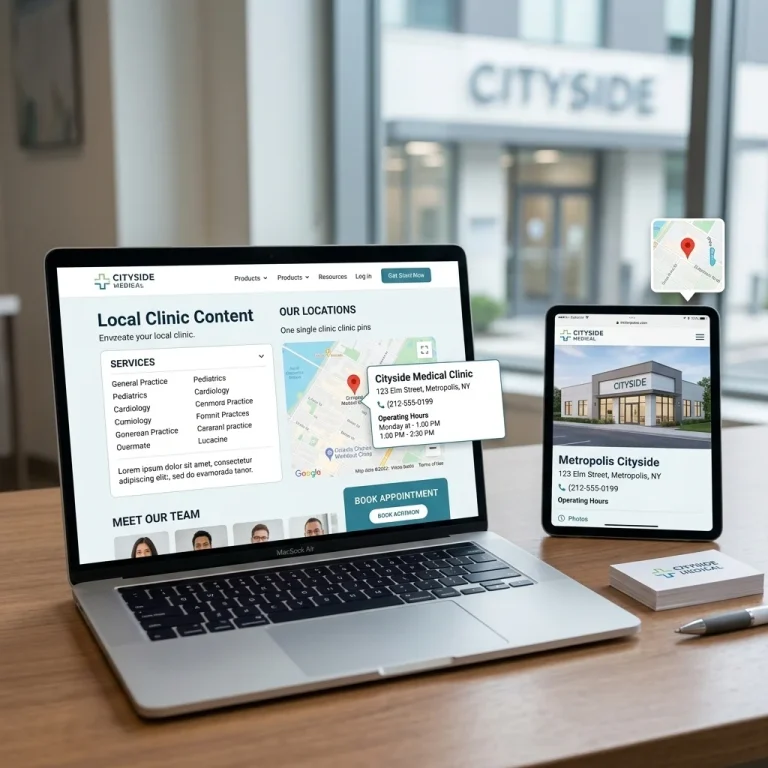
A Google Business Profile is a free business listing on Google Search and Google Maps.
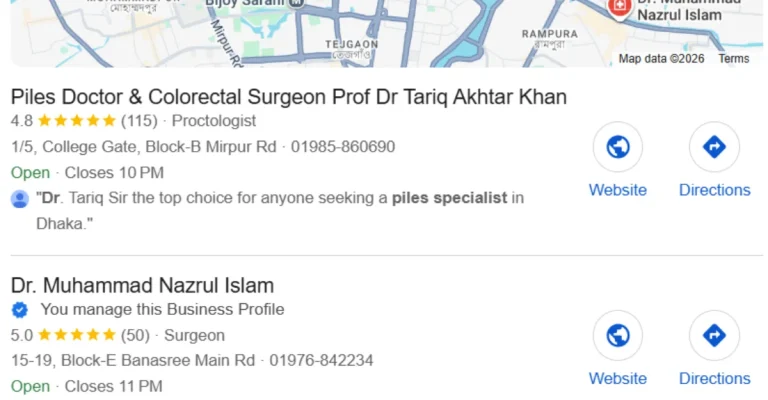
It shows your name, location, opening hours, phone number, services, photos, and reviews. For example, if someone searches for a service that you offer, your profile is usually the first thing they see. Look the image bellow. Dr. Nazrul set his service, piles, in Google Business Profile, patients is finding him.
In healthcare, it matters more than for most businesses. When it comes to selecting a doctor, the decision matters. Before going in, patients want to feel safe.
A complete, accurate profile does three things:
- It helps patients to find the right provider quickly.
- It shows your location and your hours.
- It builds trust from the start with reviews and real photos.
Google has stated that complete, accurate listings are more likely to appear in local search results; in healthcare, “complete and accurate” isn’t optional because it affects patient safety.
This page is part of your broader Local SEO for Healthcare effort, with GBP as the element you can address today.
How Patients Really Search
Patients seldom search calmly; they search because of a certain emotion. Your profile will either satisfy that emotion or it won’t.
Consider three actual moments.
Our hours, the “open now” indicator, phone number, and directions are all you need. All you have to do is tap to call or tap to drive. This settles the panic.
A patient who is ashamed. A person suffering from haemorrhoids quietly searches for help late at night. They feel embarrassed.
This helps reduce their fear because your simple explanations and genuine reviews make them feel less ashamed; when they see the phrase ‘piles treatment’ in language they understand, they feel safe and can book.
A patient who is careful. When someone is selecting a surgeon for a parent, they read all the information and feel a sense of responsibility.
Here are your credentials, along with your photos and the replies to your reviews, as evidence that you can be trusted.
The main point is that each item on your profile responds to an emotion. When you create your profile, ask yourself one question for each field: what does a worried patient need to feel at ease in this situation?
How Your Profile Feeds the Map Pack
The map pack consists of three local results with a map positioned at the top of the search results, and for ‘near me’ healthcare searches, the majority of clicks are directed to this section.
Google decides who shows up using three main factors:
- Relevance — how well your profile matches the search. Complete info helps.
- The distance — that is, how near you are to the searcher.
- Prominence — how well-known you are, including reviews and links.
An important point to keep in mind is that Google states there is no way to pay for a better local ranking; anyone who offers to “buy” your position is not being honest.
For a full local strategy beyond GBP, refer to the Local SEO for Healthcare cluster. The page remains on the profile itself.
Provider vs. Practice Profiles
This question is almost always asked of practitioners. Should the doctor and the practice each have their own profile?
The short answer is often yes, but it’s important to get the rules right because getting them wrong can have a negative effect.
What Google Allows
Google regards doctors as separate practitioners, and its guidelines make this clear.
- A public-facing professional with their own patients is called a practitioner.
- A practitioner should have a single profile associated with their primary location.
- A practitioner must not set up an individual profile for every specialty or office.
- The organisation also receives its own profile if more than one publicly accessible doctor works at the same site.
- The only thing that should appear in the practitioner’s profile title is the doctor’s name.
So a clinic usually needs two kinds of listings:
- A practice profile for the location. This shows for “orthopedic clinic near me.”
- A provider profile for each public-facing doctor. This shows up when patients search for a doctor by name.
The Two-Chamber Problem
This is where things become complicated in actual practice. Numerous specialists have more than one chamber.
Dr. Nazrul Islam, who is a colorectal surgeon (nazrulislamcolorectal.com), also treats patients at two hospitals.
The wrong move is creating a separate doctor profile at every hospital. That splits his reviews, confuses Google, and risks suspension.
The right structure:
- One provider profile for Dr. Nazrul, linked to his principal chamber. All his reviews point to a single strong point.
- Provide a single practice profile for each hospital location.
- The reviews were directed to the right places—comments about the location refer to the location, and those praising the doctor refer to his individual provider profile.
This is also true of Dr. Tanvir, an orthopedic surgeon with practices at two locations (tanvirothopedics.com); he has one clean provider profile and one profile for each chamber. There are no duplicates.
The issue is that duplicate profiles spread reviews, propagate outdated opening hours, and may result in suspension; Google makes it clear that each business location should have a single profile.
For information on provider-level strategy, refer to Doctor SEO and Clinic SEO. For large healthcare systems, see Hospital SEO.
How to Set Up Your Profile
Once you know the order, setting up a GBP is straightforward.
First, claim or set up the listing by logging in to Google with a Google account that belongs to the practice, not a personal one; look up your practice first. If Google has already created a listing for you, claim it; if not, create a new one.
Step 2: Input the main details, doing so carefully:
- Give your actual, real-life name. Don’t include any keywords or mention a city.
- Your address — that is, your precise physical location.
- A phone number which patients can use to get in touch locally.
- Hours—that is, actual hours, together with holidays and special hours.
Make sure that your name, address, and phone number are exactly the same everywhere online. We cover this in our Healthcare Local Citations and NAP Consistency section—that should be your next step after reviewing this page.
Step 3: Verify. To prove you can manage the listing, Google will offer you the option to receive a postcard, a phone call, a text message, an email, or a video call. Choose one of the available options and follow the steps; your profile may take a few days to appear completely.
In step 4 you must fill in all the fields; the more complete your profile is, the greater your chance of appearing in local search results, so don’t skip the verification process or leave any fields empty.
Choosing the Right Categories
The categories show Google what kind of site you have. If you choose them incorrectly, you may stay hidden.
Google’s rule of Google is to use the minimum number of categories that describe your main business and to make those categories specific. Categories should answer the question “What kind of business is this?” not “What does this business have?”
Set one primary category as your true specialty:
- Dr. Nazrul, colorectal surgeon
- Dr. Tanvir – orthopedic surgeon
- A family clinic → “Family practice physician”
Include some additional secondary categories for services that you actually provide, such as “Pediatrician” or “Walk-in clinic.”
Avoid using too many categories as keywords, since a vague or overloaded category can bury your account and may even result in a suspension.
Listing Services in Patient Language
Patients do not search in the way that doctors do; they search according to how they feel.
Match your services to their words:
- Include both ‘piles’ and ‘fissure’ — not just ‘hemorrhoidectomy’.
- Include “knee pain” and “fracture” — not just “arthroscopy.”
- Name “back pain”, “heartburn”, and “skin rash” — start with ordinary words.
You can continue to use the clinical term, but start with the phrase ‘a patient types at 2 a.m’ This small alteration helps the appropriate patients locate your site.
Photos and Images — With Privacy Care
Photos quickly build trust because they let a nervous patient visualize your area before they arrive.
Add these:
- That is how people find the building entrance.
- There is a clean waiting area and an exam room.
- The doctor and his team were professionally shot.
Here is the warning: you must never publish anything that identifies a patient, including no pictures of a patient’s face, no visible charts, no screens showing health data, and no ‘before and after’ images without the appropriate written consent.
Under the HIPAA Privacy Rule, providers must protect identifiable health information, and a photo can be just as likely to violate that rule as a document. If you’re unsure, then omit it or consult a compliance professional.
Using Google Posts
Google Posts are brief updates that appear on your profile and help keep it current and active.
For healthcare, keep posts simple and useful:
- New service lines, such as telehealth.
- Holiday hours and closures.
- Health-awareness reminders.
- New provider announcements.
Try to publish one post each month, and avoid references to promotions or price discussions, since Google doesn’t encourage sales-oriented content in your profile.
HIPAA-Aware Review Replies
Reviews affect both ranking and trust; replying shows you care, but in healthcare, a careless reply can breach the law.
Here’s the trap: even confirming that someone is your patient in public can disclose protected health information. A public “thank you for your visit last Tuesday” confirms care happened. That can be a violation.
Answer in a friendly manner, but don’t provide any details.
Unsafe reply (do not do this):
Thank you, Mrs. Rahman! I’m pleased to hear that your surgery for the piles on Tuesday was a success. We’ll see each other at your follow-up next week.
That answer shows that she is a patient, identifies her illness, and includes her timetable. There are three privacy problems in that one sentence.
Safe reply (do this):
We appreciate the kind words and the trust you’ve placed in us. If you want to provide details, please call the office, and we will be happy to help.
The appropriate response is warm; it thanks the person, moves the details off-line, and offers no confirmation.
For all reviews, use the same simple template: thank them, keep the response general, and move the details to the phone call. To find out more about the deeper trust framework associated with healthcare content, refer to YMYL SEO. If a case seems difficult, get advice from a qualified compliance professional.
Who Owns the Profile
A profile that is not owned by anyone becomes outdated. That’s why stale profiles lead to the locked-door situation right from the start of this guide.
Set clear ownership:
- Designate one person as the profile owner.
- Have them update the hours, photos, posts, and replies.
- Make sure to update yourself regarding holidays, closures, and any changes to the hours or phone number.
Be aware of two minor risks. Since Google lets users suggest edits that can be published without your permission, make sure to turn on notifications. Also, as duplicate profiles divide up your data, you should report them and merge them.
A single incorrect detail can cause trust to be lost at the most不利 moment. Approach your profile like your front door—make sure it is accurate every day.
Notes for Multiple Locations
Managing multiple locations creates real difficulties because reviews are scattered, hours change, and you end up with too many duplicate profiles.
The basic rule still applies: a single profile for each location and one provider profile for each publicly accessible doctor, with the reviews being routed correctly.
To apply this approach across multiple sites, you need a complete system. This system is set out in the Multi-Location Healthcare SEO guide. For website pages that support each profile, refer to Location Pages for Healthcare Websites.
How an Expert Fixes Your GBP
You can handle most of these yourself, but providers are busy, and the details are easy to overlook.
What the expert does:
- Verify and make your profile claims.
- Assigns the correct primary and secondary categories.
- Writes services in words patients can understand.
- Establishes the proper provider-versus-practice structure in both chambers.
- Identifies and removes duplicate or obsolete profiles.
- Establishes a safe review process that is aware of HIPAA.
- Make a simple governance plan.
What you supply — a checklist:
- Legal practice name
- All addresses, including every chamber
- All phone numbers
- Exact hours, including holidays
- Provider credentials and registration numbers
- Full service list
- Profile and verification access
- Approved, patient-safe photos
- Your online booking link
An experienced expert can incorporate this aspect into your overall plan. For more information on how it fits in, see the full Healthcare SEO Services program.
Quick Recap Checklist
Before you call your profile done, check these:
- ✅ Claimed and verified
- ✅ Accurate name, address, phone, and hours (with holidays)
- ✅ Correct primary and secondary categories
- ✅ Services written in patient language
- ✅ Provider and practice profiles structured correctly
- ✅ Patient-safe photos only
- ✅ A safe, HIPAA-aware review-reply template
- ✅ One clear profile owner
Frequently Asked Questions
What does a Google Business Profile for a provider entail?
The free listing that you have on Google Search and Maps displays your name, address, opening hours, the services you provide, photographs, and reviews so that patients can quickly find and trust you.
Should both the doctor and the practice have a profile?
Yes, usually. The practice obtains a profile as a result of its location. Each doctor who is publicly accessible has one provider profile associated with their main location.
I am employed at two chambers; how many profiles will I require?
You’ll have one provider profile linked to your main chamber and one practice profile for each location; don’t set up a separate doctor profile at each chamber since it will split the reviews and could result in your suspension.
What is the best way to select the correct category?
Choose the most specific main category that corresponds to your actual area of specialty, for example “Colorectal surgeon”. Include a couple of real secondary categories and keep the number as low as possible.
Is it possible to respond to a review without violating HIPAA?
Yes, as long as you keep your response general. Thank them without giving details, and address specific points over the phone. You mustn’t confirm in public that someone is your patient.
May I include patient photos on my profile?
Not without proper written consent; you should never publish patient faces, charts, or screens containing health data, since a photo can violate HIPAA just as easily as a document can.
How frequently should I update my profile?
Update your hours and add new contact information as soon as anything changes. Add some new photos every few months and post once a month. Quickly respond to any reviews.
Will the use of GBP lead to higher rankings?
By no means does any method ensure particular rankings. Although a complete and accurate profile helps improve your local visibility, results depend on several factors and can change over time.
Your Next Step
Begin by looking up your own practice name on Google.
Consider what is listed. Is the listing claimed? Are the hours accurate? Does the categorisation match your needs?
Note any errors or omissions, since that brief review shows where you should start.
If you want to link your profile to a complete local strategy, you can look into the Local SEO for Healthcare cluster or arrange a consultation.
About the Author
Md. Salauddin Biswas specializes in SEO relating to the structure and content of healthcare websites. He assists doctors and clinics in converting complicated medical subjects into clear, reliable, and well-organized content.
He earned a master’s degree in Medical Anthropology from the University of Heidelberg in Germany and a master’s degree in Islamic History and Culture from the University of Dhaka, graduating with first class and first position. He was a former Senior Research Associate at the James P Grant School of Public Health at BRAC University and is a published author in peer-reviewed health research. Since 2017 he has been working in healthcare SEO and lives in Dhaka, Bangladesh. He also acts as Director and Head of Content at SA WEBSOFT.
Learn more at salauddinbiswas.com/about/
Editorial Note
This article helps healthcare providers manage their Google Business Profile; it has been checked against current Google Business Profile guidelines and HHS HIPAA resources; and it is updated whenever Google changes its features and rules.
References
- “Tips to improve your local ranking on Google.” Google Business Profile Help. support.google.com/business/answer/7091
- “Guidelines for representing your business on Google.” Google Business Profile Help. support.google.com/business/answer/3038177
- “The HIPAA Privacy Rule.” U.S. Department of Health & Human Services. hhs.gov/hipaa/for-professionals/privacy/index.html
- Dr. Nazrul Islam, Colorectal Surgeon (real-world example). nazrulislamcolorectal.com
- Dr. Tanvir, Orthopedic Surgeon (real-world example). tanvirothopedics.com



2 Comments